How to get ready for a swim meet (in case you missed the new family meeting)
If you missed the New Family Swim Team meeting, the info below is provided to help you prepare for the swim meets!
Heat Sheets are emailed out the morning of the meet:
-By Event (for the order of events)
-By Name (for finding your swimmer’s events)
-The column of numbers that look like a fraction "1/2" are in the order of "Heat" / "Lane"
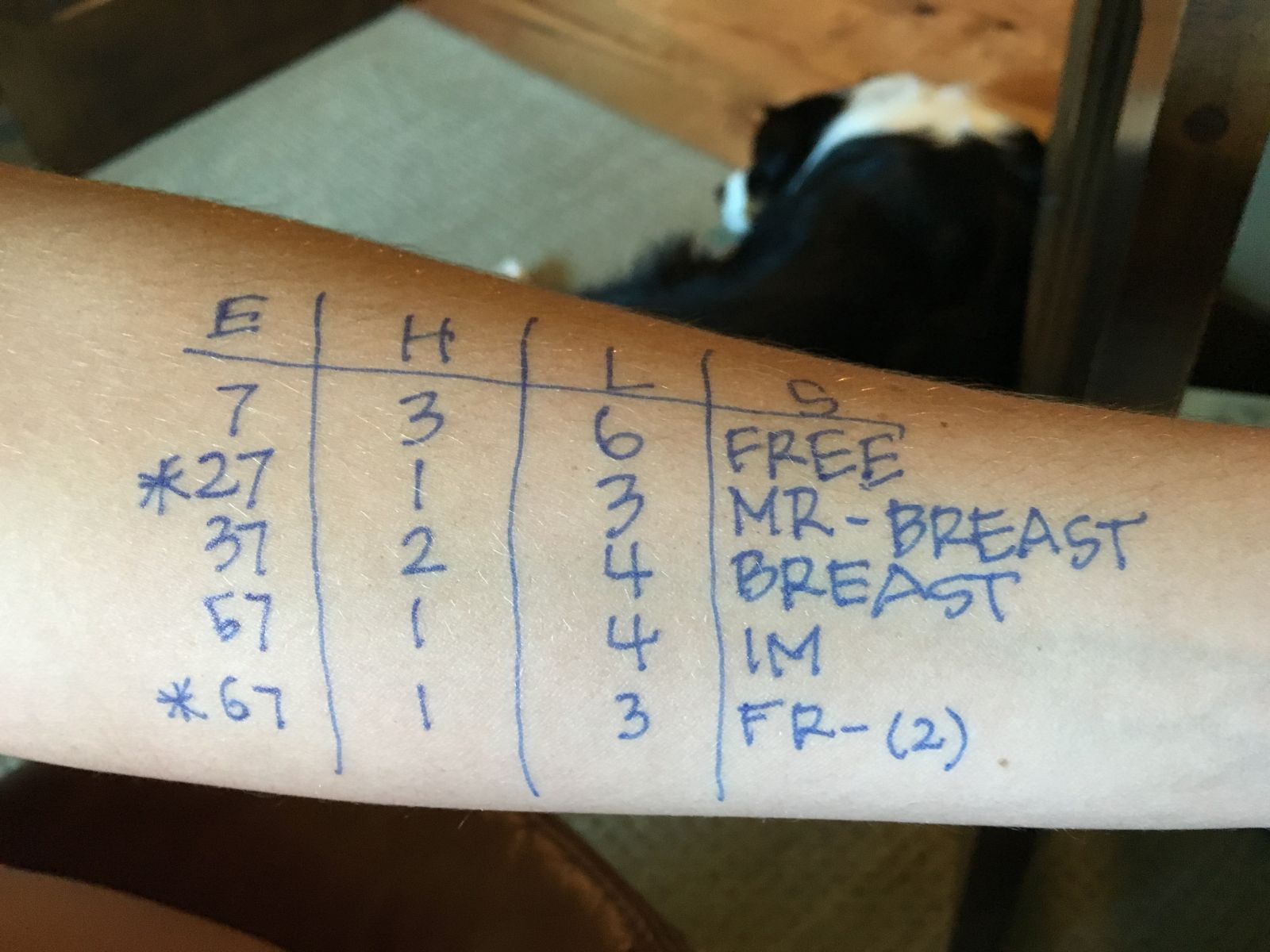
Write on arm or leg with a black sharpie marker: (Image attached)
EHLS = EVENT_ HEAT_LANE_STROKE
What to bring to the swim meets:
-Print your own heat sheet! You really need one!
-In a black sharpie marker, write your swimmer’s name and age on their back right shoulder
-Label your t-shirt!
-bring 2 towels (both will be soaked by the end of the night)
-bring a bag for wet things
-extra goggles
-swim cap
-sweatshirt
-UNO cards, Card games, Notebooks/Pens for hangman, etc.
-Note: Don’t Bring Electronics/They will get wet or lost
-Cash for concessions at home and away (dinner, snacks, ice cream)
-Label everything!
-Bring extra sharpies to write on your heat sheets
-Sunscreen: write the EHLS and let it dry before you apply sunscreen so it won’t wipe off
Parking:
-Home meets: parking available!
-Away meets: prepare to get there early so you can walk; you can drop off your (older) swimmers/things and park where you can; follow directional signs
Volunteers:
-Check in with Vivian, Tiffany or Ashley at the volunteer check-in table (entrance of the pool)
-Check in time is during warm-ups (we will be set up at 5:00 p.m.)
-First half volunteers, pick up your supplies to work your shift (ex: timers for first half, etc.)
-Checking-in makes sure you get credit for working your shift
-All timers and place judges: there will be a meeting with the ref at 5:30. Please listen for the announcement for location on the pool deck.
-Volunteers change at event 44 (unless you hear from the announcer)
-Second Half volunteers will need to BOTH:
- Check-in at the table upon arrival (to get credit for your shift)
- At the changeover, go to your position and replace the first-half volunteer
Bullpen:
-We ask that you keep your children 8 and under in the bullpen area (it’s very fun for them!)
-If your child will be sitting with you, you must let the bullpen parent and coaches know ASAP where you are sitting
-If your child will be staying with you, PLEASE walk your swimmer to the bullpen for a relay 6 events numbers before your race! The bullpen parents need to line up relays together!
Don’t forget to come to practice the day after the meet for Fun Day!
-No 7:30 a.m. practice the morning after the meet
-Fun day! Donuts, sharks & minnows
-Kids will pick up their place ribbons in their named folder
-Kids still swim with their regular practice times due to coach/swimmer ratios
Go Man O' Wars!!!

